

Contact
Write to Us And We Would Be Happy to Advise You.
Do you have any questions, or would you like to speak directly with a representative?
By Fariha
For an industrial membrane switch, actuation force typically falls into three practical ranges: light touch at approximately 180g, standard at around 280g, and heavy-duty at 350g and above. But the force your operator actually feels is not just a function of the dome’s rated spec — it is the result of your full assembly: dome material, overlay thickness, embossing geometry, and mounting panel stiffness all contribute to perceived force. If you specify a 300g dome and ignore the stack-up, your production switch may feel two to three times harder than expected.
This page is written for hardware design engineers and OEM product teams who are currently setting tactile feedback specifications for a membrane switch or membrane keypad. Whether you are designing for a gloved-hand industrial panel, a sterile-field medical device, or a consumer-facing appliance interface, the goal here is to help you arrive at the right force value before you write an RFQ — not after you receive a prototype that doesn’t match what you imagined.
Niceone-Keypad’s design and engineering team, working across our Dongguan factory and our US office in Redding, CT, handles force specification as part of every custom membrane switch engagement. Here is what you need to know.
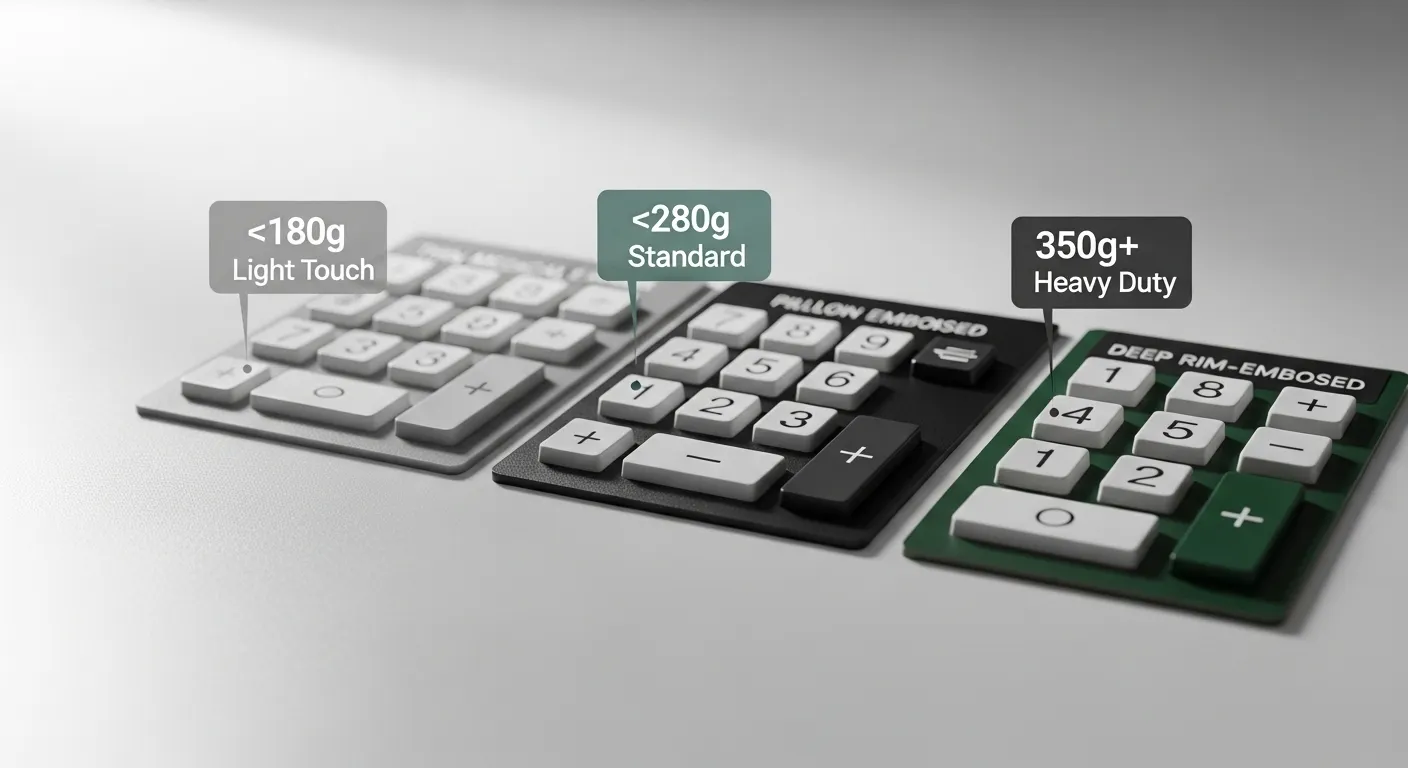
Industrial membrane switch actuation force is measured in grams-force (gf) and refers to the force at which the switch trips — not the force required to fully depress it. That second value, the full-travel pressure, is the operating force, and the two are not interchangeable.
For industrial and OEM applications, practical force ranges break into three tiers:
These ranges describe the dome’s rated actuation force as a standalone component. What you will actually spec in your RFQ is this value — but what your operator will feel depends on more than this number alone.
If you are new to how membrane switch layers interact, the layer anatomy is covered in detail in our membrane switch engineering resource.
The dome is the primary force-generating component in a tactile membrane switch. Three dome types are common in OEM designs:
Stainless steel metal domes produce a sharp, defined snap. They are available in a wide force range — roughly 180g to 700g — and hold tight tolerances (approximately ±30g as a standalone component). Four-leg dome geometry and triangle-leg geometry produce different collapse profiles; four-leg domes tend to feel softer on approach with a sharper break point, while triangle-leg domes offer a more linear pre-actuation feel.
Polyester (poly) domes are softer, with a more progressive force curve. They suit low-force applications and cost-sensitive designs but do not deliver the same tactile snap as stainless steel.
Silicone rubber keypads work differently — they produce a progressive compression without a snap-through event. If your spec requires a distinct click confirmation, a silicone rubber keypad is the wrong choice; a metal dome membrane switch is the correct path.
Dome diameter also matters: smaller diameter domes (8–10mm) produce less force for a given thickness; larger domes (14–18mm) require more force to collapse and deliver more tactile feedback.
For dome selection within a full design spec, see our guidance on membrane switch engineering design rules.
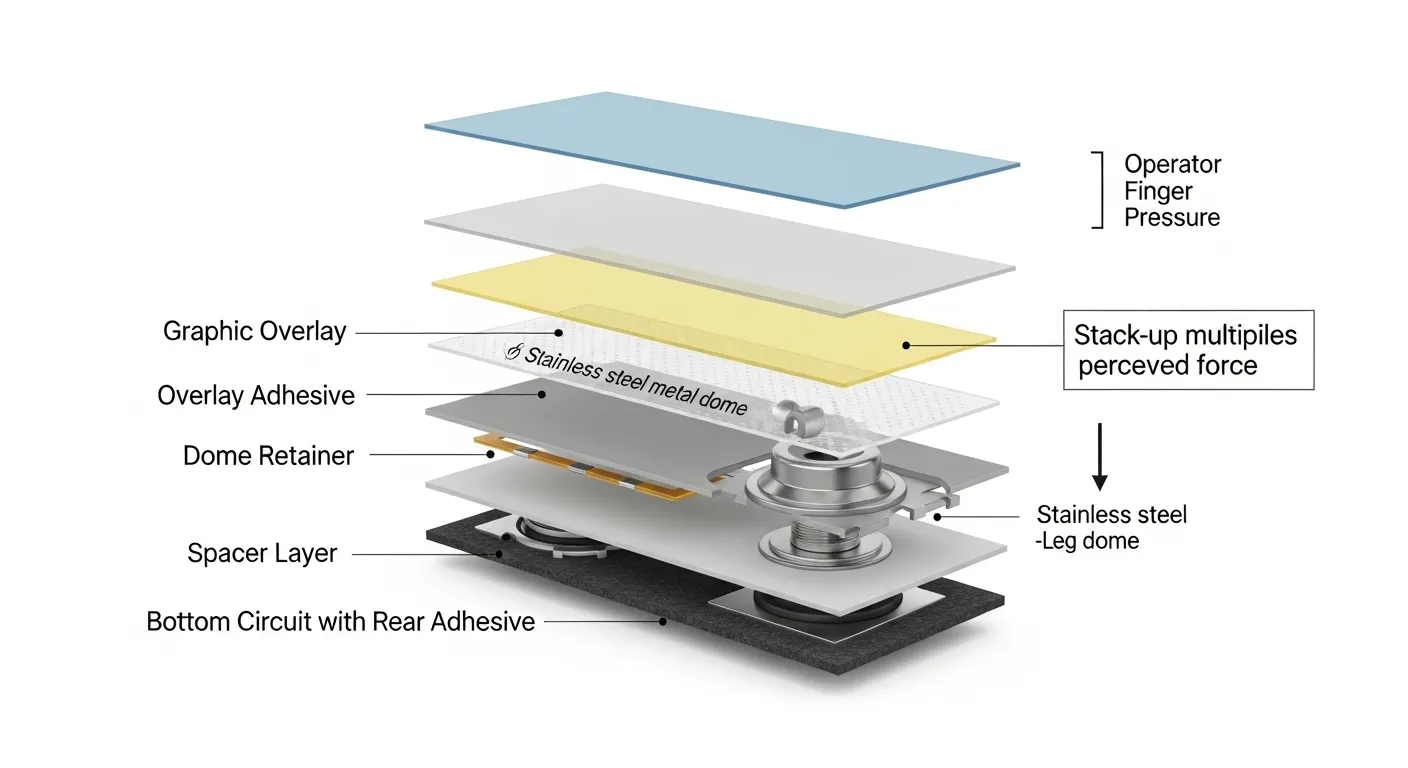
This is the most critical — and most frequently misunderstood — aspect of force specification.
A membrane switch is not a dome sitting in free air. It is a layered system: graphic overlay, overlay adhesive, dome retainer, circuit layer, spacer, bottom circuit, rear adhesive, and in many designs, a rigid or semi-rigid mounting panel. Each of these layers adds spring resistance that the operator’s finger must overcome before the dome collapses.
Think of it as springs in series: a 300g-rated stainless dome assembled onto a thin flexible aluminum panel with a 0.125mm PC overlay and standard adhesive layers may register as 500g or higher under an operator’s finger. On a stiffer steel-backed assembly with thicker overlay, the same dome can feel even heavier.
The practical implication: never specify force based on the dome’s catalog rating alone. Specify the perceived force target, and then let the prototype validate whether the stack-up achieves it. If your target is 280g perceived actuation, you may need a 220–240g dome once the overlay and panel stiffness are accounted for.
This is also why force tolerance in a full assembly is wider than standalone — plan for ±20–30% variation in perceived force across a full production stack-up rather than the ±30g standalone dome tolerance.
Your graphic overlay is not a neutral layer — it is an active participant in the force the operator perceives.
A thicker overlay combined with pillow emboss will soften the perceived snap considerably. A thin PET overlay with rim or dome emboss will produce the crispest, most defined click. Design these two variables together — not independently.
Use this table to narrow your target range before requesting a prototype. Treat it as a starting point; your specific mounting panel and overlay spec will shift the final perceived force.
| Use Case / Environment | Recommended Force Range | Dome Type | Overlay Material | Embossing Style | IP Consideration |
|---|---|---|---|---|---|
| Medical / sterile-field (bare finger, precision) | 150–220g | Stainless light dome or polydome | Thin PET (0.075–0.125mm) | Pillow or none | IP65 overlay sealing adds resistance — reduce dome force to compensate |
| Consumer panel (home appliance, telecom) | 180–250g | Polydome or light stainless dome | PET or thin PC | Pillow emboss | Standard; no IP coating unless required |
| Standard industrial control (bare finger) | 250–320g | Stainless dome (4-leg) | PET 0.125–0.175mm or PC | Pillow or rim emboss | IP65 if panel-sealed environment |
| Gloved-hand industrial / outdoor | 350–450g | Stainless steel heavy dome | PC or thick PET | Rim or dome emboss | IP65 / IP67 — plan additional 30–50g for sealing overlay resistance |
| Harsh environment (wash-down, marine, food) | 380–500g | Heavy stainless dome | Chemical-resistant PC | Rim or dome emboss | IP67 / IP69K — sealing adds appreciable perceived force |
For gloved-hand applications, note that industrial gloves reduce fingertip sensitivity significantly. Operators working in standard nitrile or leather gloves typically cannot confidently detect actuation below 350g. Heavy gloves (insulated, rubber-coated) raise this threshold further.
If your application involves an IP65 or IP67-sealed overlay, plan to increase your dome force selection by approximately 30–50g to offset the additional resistance introduced by the sealing layer and thicker overlay — and validate this in your prototype run.

Actuation force is one of the specifications your factory needs to get right before cutting tooling. Do not leave it undefined in your RFQ.
Force specification checklist for your RFQ:
Sending this information upfront prevents the most common force-related rework cycle: the sample arrives, the force feels wrong, the dome spec is revised, a second prototype is ordered. Getting the stack-up right in the first prototype saves four to six weeks of iteration.
Our design team works through the force specification as part of the formal design service workflow — details on that process are here: membrane switch design service flow.
Actuation force is the pressure at which the switch trips — when the electrical circuit closes. Operating force is the pressure required to fully depress the key to its travel stop. For most membrane switch applications, actuation happens well before full depression. In gloved-hand or medical designs, specifying both values separately is worth doing.
Because every layer in the stack-up adds spring resistance. Overlay, adhesives, spacer, and mounting panel all resist finger pressure before the dome collapses. A 300g-rated dome can register as 500g or more in a full flexible-panel assembly. Prototype validation — not catalog math — is the only reliable way to confirm perceived force.
Plan for 350–450g minimum. Industrial gloves significantly reduce tactile sensitivity. Rim or dome embossing sharpens the snap and improves operator confidence. If an IP67 overlay is involved, add another 30–50g to your dome selection to account for sealing layer resistance.
Yes. Waterproof overlays are typically thicker and bonded with additional adhesive layers — both add resistance to perceived force. Select a slightly lower dome force rating than you would for a standard panel, then validate in a prototype. The exact offset depends on the overlay material and thickness specified.
Limited adjustment is possible through dome swaps if the dome retainer accommodates a different dome size. Significant force changes after tooling generally require a new overlay or retainer revision. Getting the force specification right in the prototype phase is far more efficient than adjusting post-tooling.
If you have identified your target force range and are ready to validate how your stack-up performs, Niceone-Keypad’s team can produce prototype variants across multiple force options in a single prototype run — so you can physically compare 250g, 300g, and 350g domes in your actual overlay and panel configuration before committing to production.
Our Dongguan factory handles the production engineering. Our Connecticut office provides US-timezone support for spec review, force selection discussion, and file review.
To get started, send us the following through our prototype service request:
We will confirm dome selection, overlay spec, and any force compensation adjustments before the prototype goes into production.
Do you have any questions, or would you like to speak directly with a representative?

